
You’re running ads, posting on social media, sending emails — but which of these actually leads to sales? Most business owners have a vague sense that “everything matters,” but when budget gets tight, vague doesn’t cut it.
Marketing touchpoints are every interaction a potential customer has with your brand before (and after) they buy. Understanding which touchpoints actually drive conversions — and which just burn money — is the difference between profitable marketing and expensive guesswork.
In this guide, I’ll break down what touchpoints are, how to track them without invasive tracking, and most importantly — how to figure out which ones deserve your attention.
What Are Marketing Touchpoints?
A touchpoint is any moment where a potential customer interacts with your brand. This could be:
- Seeing your ad on Instagram
- Reading a blog post from a Google search
- Getting a recommendation from a friend
- Receiving your email newsletter
- Chatting with your support team
- Walking past your physical store
The problem? A typical customer doesn’t just see one ad and buy. According to Salesforce research, the average B2C customer uses 6-8 touchpoints before making a purchase. For B2B, it’s often 15-20+.
This creates a messy reality: if someone sees your Facebook ad, then Googles your brand, reads two blog posts, signs up for your newsletter, and finally buys after clicking an email link — which touchpoint gets the credit?
The Three Stages of Touchpoints
It helps to organise touchpoints by where they fall in the customer journey:
1. Awareness Stage (Before They Know You)
The customer has a problem but doesn’t know you exist yet.
| Touchpoint | Example | What to Track |
|---|---|---|
| Organic search | Finding your blog via Google | Landing page, time on site, bounce rate |
| Social media | Seeing a post or reel | Impressions, engagement, profile visits |
| Paid ads | Display, search, or video ads | Impressions, CTR, cost per click |
| Word of mouth | Friend recommendation | Referral source (ask in forms) |
| PR/Media | Article mention, podcast | Referral traffic, brand search volume |
2. Consideration Stage (Evaluating Options)
They know you exist and are comparing you to alternatives.
| Touchpoint | Example | What to Track |
|---|---|---|
| Website visits | Browsing product/pricing pages | Pages per session, pricing page views |
| Reviews | Reading G2, Trustpilot, Google reviews | Review site referrals |
| Comparison content | “You vs Competitor” searches | Comparison page traffic |
| Email nurture | Educational email sequence | Open rate, click rate, replies |
| Free trial/demo | Signing up to test | Trial signups, activation rate |
3. Decision Stage (Ready to Buy)
They’ve decided to buy — the question is when and from whom.
| Touchpoint | Example | What to Track |
|---|---|---|
| Cart/checkout | Adding items, entering payment | Cart abandonment rate, checkout completion |
| Sales call | Talking to a rep | Call-to-close rate, deal size |
| Retargeting ads | “You left something in your cart” | Return rate, conversion rate |
| Discount/offer | Limited-time promo email | Redemption rate, revenue per email |
| Live chat | Pre-purchase questions | Chat-to-conversion rate |
Why Touchpoint Tracking Matters (With Numbers)
Here’s a scenario I see constantly:
A small e-commerce store spends $3,000/month on Facebook ads and $500/month on email marketing. The Facebook dashboard shows 50 conversions. The email tool shows 120 conversions. The actual store had 140 orders.
What happened? Both platforms are claiming credit for the same conversions. Someone saw a Facebook ad, didn’t buy, then converted from an email a week later. Facebook says “that’s my conversion.” Email says the same.
Without proper touchpoint tracking, you might:
- Kill the email program because “Facebook is doing all the work”
- Double your Facebook budget (when it’s actually just the first touch, not the closer)
- Never realise that your blog content is silently doing the heavy lifting
In my experience working with e-commerce clients, proper attribution often reveals that 30-50% of “last-click” Facebook conversions actually had 2-3 prior touchpoints. The ad didn’t convince them — it just happened to be the last thing they clicked.
Attribution Models: Who Gets Credit?
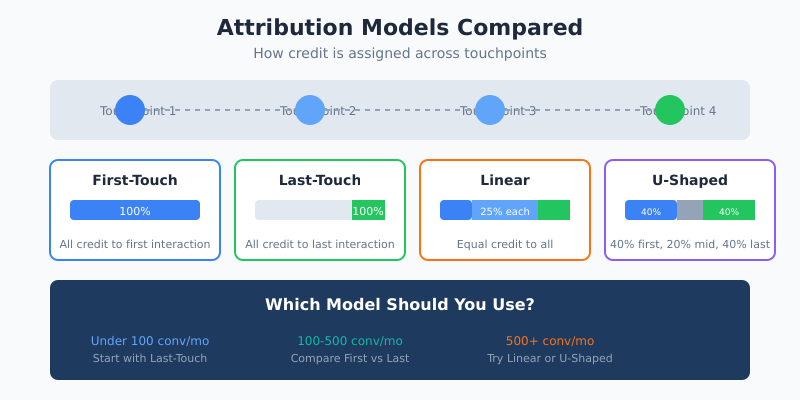
When a customer touches multiple channels before buying, you need rules for distributing credit. These rules are called attribution models.
Single-Touch Models
These give 100% credit to one touchpoint.
| Model | How It Works | Best For | Limitation |
|---|---|---|---|
| First-touch | 100% credit to first interaction | Understanding awareness channels | Ignores everything that closed the deal |
| Last-touch | 100% credit to final interaction | Short sales cycles, impulse buys | Ignores what generated initial interest |
| Last non-direct | Ignores direct visits, credits the last campaign | Filtering out bookmarks and direct traffic | Still ignores the full journey |
Multi-Touch Models
These distribute credit across multiple touchpoints.
| Model | How It Works | Best For | Limitation |
|---|---|---|---|
| Linear | Equal credit to all touchpoints | Simple multi-touch understanding | Treats all touches as equally important |
| Time-decay | More credit to recent touchpoints | Longer sales cycles | Undervalues awareness activities |
| U-shaped (Position-based) | 40% first, 40% last, 20% middle | Valuing both discovery and conversion | Arbitrary percentage split |
| W-shaped | Adds weight to lead creation moment | B2B with clear lead stages | Complex to implement |
| Data-driven | Algorithm determines credit based on patterns | High-volume businesses with good data | Requires significant data; black box |
Which Model Should You Use?
Here’s my practical advice:
- Under 100 conversions/month: Start with last-touch. It’s simple and directionally useful. Don’t overcomplicate it.
- 100-500 conversions/month: Compare first-touch and last-touch side by side. The differences reveal which channels are “introducers” vs “closers.”
- 500+ conversions/month: Consider linear or U-shaped models. You have enough data for multi-touch to be meaningful.
- 1000+ conversions/month with long cycles: Look into data-driven attribution if your analytics tool supports it.
The dirty secret of attribution? No model is “correct.” They’re all simplifications of complex human behaviour. The goal isn’t perfect accuracy — it’s better decision-making than “gut feel.”
How to Track Touchpoints (Privacy-First Approach)
Here’s where most guides lose me. They assume you’re using Google Analytics with full cross-device tracking, remarketing pixels, and third-party cookies. In 2024+, that approach is increasingly broken:
- Cookie consent banners block 30-50% of tracking
- iOS users often can’t be tracked across sessions
- Ad blockers are used by 30%+ of tech-savvy audiences
- Privacy regulations make extensive tracking legally risky
So how do you track touchpoints without invasive tracking? Here’s what actually works:
1. UTM Parameters (The Foundation)
UTM parameters are tags you add to URLs to identify traffic sources. They work with any analytics tool and don’t require cookies.
https://yoursite.com/pricing?utm_source=facebook&utm_medium=paid&utm_campaign=spring_sale&utm_content=video_adKey parameters:
utm_source— Where the traffic comes from (facebook, google, newsletter)utm_medium— Type of traffic (paid, organic, email, referral)utm_campaign— Specific campaign nameutm_content— Ad variation or link placement
Pro tip: Create a UTM naming convention and stick to it. facebook vs Facebook vs FB will show as three different sources.
2. First-Touch Capture
Store the first UTM parameters when someone arrives, and attach them to any conversion event. Most privacy-first analytics tools (Plausible, Fathom, Umami) do this automatically.
If you’re using a simple setup, you can capture first-touch with a small script:
// Save first touch source (only if not already saved)
if (!localStorage.getItem('first_touch')) {
  const params = new URLSearchParams(window.location.search);
  const source = params.get('utm_source') || document.referrer || 'direct';
  localStorage.setItem('first_touch', source);
}

// Later, include in form submission or purchase event
const firstTouch = localStorage.getItem('first_touch');
3. Ask Customers Directly
This sounds old-fashioned, but it’s surprisingly effective. Add a “How did you hear about us?” field to your checkout or signup form.
Options to include:
- Search engine (Google, Bing)
- Social media (specify which)
- Friend or colleague recommendation
- Podcast or YouTube
- Online article or blog
- Other (free text)
This captures touchpoints that analytics can’t see — like word-of-mouth, podcast mentions, or seeing your founder speak at an event. In my experience, 10-30% of customers report discovery channels that never showed up in analytics.
4. Conversion Events, Not Just Pageviews
Track meaningful actions, not just visits:
- Micro-conversions: email signup, add to cart, pricing page view, demo request
- Macro-conversions: purchase, paid subscription, signed contract
In tools like Plausible or Umami, you can set up custom events with a single line of code:
// Plausible example
plausible('Signup', {props: {plan: 'pro', source: firstTouch}});

// Umami example
umami.track('purchase', {value: 99, currency: 'USD'});
Essential KPIs for Each Stage
Different touchpoints need different metrics. Here’s what to measure at each stage:
Awareness Stage KPIs
| KPI | What It Tells You | Healthy Benchmark |
|---|---|---|
| Impressions | How many people saw your content | Depends on channel/budget |
| Click-through rate (CTR) | How compelling your message is | 1-3% for ads, 2-5% for email |
| Cost per click (CPC) | Efficiency of paid channels | $0.50-$3.00 (varies by industry) |
| New visitor rate | Are you reaching new people? | 60-80% for awareness campaigns |
Consideration Stage KPIs
| KPI | What It Tells You | Healthy Benchmark |
|---|---|---|
| Pages per session | Engagement depth | 2-4 pages |
| Time on site | Content quality/relevance | 2-4 minutes |
| Return visitor rate | Brand memorability | 20-40% |
| Email signup rate | Interest in ongoing relationship | 1-5% of visitors |
| Pricing page views | Purchase intent signals | Track as % of total visitors |
Decision Stage KPIs
| KPI | What It Tells You | Healthy Benchmark |
|---|---|---|
| Conversion rate | Percentage of visitors who buy | 1-3% e-commerce, 2-5% SaaS trials |
| Cart abandonment rate | Checkout friction | 60-80% is normal (yes, really) |
| Cost per acquisition (CPA) | Total cost to get a customer | Should be <30% of customer LTV |
| Average order value (AOV) | Revenue efficiency | Track trends over time |
Practical Example: Mapping a Real Customer Journey
Let me walk through a real example from an online store selling specialty coffee equipment (details anonymised):
Customer journey for a $180 espresso grinder purchase:
- Day 1: Googles “best espresso grinder under $200” → lands on a comparison blog post (organic search)
- Day 1: Reads 3 articles, leaves without buying (bounce? no — engaged visitor)
- Day 4: Sees retargeting ad on Instagram → clicks to product page (paid social)
- Day 4: Adds to cart, gets distracted, abandons
- Day 5: Receives cart abandonment email → ignores it
- Day 8: Googles brand name directly → returns to site (direct/brand search)
- Day 8: Completes purchase
How different attribution models would credit this:
| Model | Credit Assignment |
|---|---|
| Last-touch | 100% to Direct (brand search) |
| Last non-direct | 100% to Instagram ad |
| First-touch | 100% to Organic search (blog) |
| Linear | 33% blog, 33% Instagram, 33% direct |
| U-shaped | 40% blog, 20% Instagram, 40% direct |
See the problem? If this store only looked at last-click, they might think “our blog doesn’t drive sales” and stop investing in content. But the blog is what started the entire journey.
Common Mistakes (And How to Avoid Them)
Mistake 1: Trusting Platform-Reported Conversions
Facebook, Google, and every ad platform will over-report conversions. They have incentive to make themselves look good.
Fix: Use your own analytics as the source of truth. Compare platform-reported conversions with your actual orders. A 20-30% discrepancy is normal; anything higher suggests tracking issues.
Mistake 2: Ignoring Offline Touchpoints
Someone hears about you at a conference, then Googles your name later. Analytics shows “organic search” as first touch — missing the real story.
Fix: Use unique landing pages or discount codes for offline activities. yoursite.com/conference or promo code EVENT2024.
Mistake 3: Over-Engineering Attribution
I’ve seen businesses spend months building complex attribution models while their checkout page had a bug losing 10% of orders.
Fix: Start simple. Get basic tracking working first. Fancy attribution is pointless if your foundational data is broken.
Mistake 4: Analysing Too Short a Window
If your average purchase takes 3 weeks of consideration, looking at 7-day attribution windows will miss most of the journey.
Fix: Match your attribution window to your actual sales cycle. For high-consideration purchases, use 30-60 day windows minimum.
When You DON’T Need Complex Attribution
Not every business needs multi-touch attribution. Save yourself the complexity if:
- You have one main acquisition channel — If 80% of customers come from one source, focus on optimising that instead of building attribution models
- Your sales cycle is under 24 hours — Impulse purchases don’t need journey mapping
- You have under 50 conversions/month — The data is too sparse for meaningful patterns
- You’re pre-product-market-fit — Focus on whether people want what you’re selling before optimising how you sell it
In these cases, simple last-click attribution plus qualitative feedback (“how did you hear about us?”) is enough.
Action Steps: What to Do This Week
Here’s a practical checklist to improve your touchpoint tracking:
- Audit your UTM usage — Are all campaigns tagged consistently? Create a naming convention doc if you don’t have one.
- Set up conversion tracking — Make sure your analytics tool tracks actual purchases/signups, not just pageviews.
- Add “How did you hear about us?” — Put this on your signup or checkout form. Keep options simple.
- Compare first vs last touch — Run both reports and look for channels that appear in one but not the other.
- Document your customer journey — Talk to 5 recent customers about their path to purchase. You’ll learn things data can’t tell you.
Bottom Line
Marketing touchpoints aren’t just an analytics concept — they’re how customers actually experience your brand. Every ad, every email, every blog post is a moment that either moves someone closer to buying or pushes them away.
You don’t need enterprise-level attribution software to understand your touchpoints. Start with consistent UTM tagging, track conversions (not just visits), and ask customers directly how they found you. Compare first-touch and last-touch reports to see which channels introduce customers versus which ones close deals.
The goal isn’t perfect attribution — it’s making better decisions than you would with no data at all. Even simple touchpoint awareness will help you stop wasting money on channels that don’t work and double down on those that do.