
Every analytics report you’ve ever seen relies on sessions. Session count. Pages per session. Average session duration. Bounce rate (sessions with only one pageview).
But what exactly is a session? How does your analytics tool decide when one session ends and another begins?
Understanding sessions isn’t just academic. Miscounting sessions skews every metric that depends on them—which is nearly all of them. Different analytics tools count sessions differently, which means switching tools can make your numbers jump or drop overnight.
In this guide:
- What is a session (simple definition)
- How sessions start and end
- The 30-minute timeout rule
- Session vs pageview vs unique visitor
- How different tools count sessions
What Is a Session? The Simple Definition
A session (also called a “visit”) is a group of interactions that a single user performs on your website within a specific time period.
Think of it like a visit to a physical store:
- You walk in (session starts)
- You browse different sections (pageviews)
- You leave (session ends)
If you come back an hour later, that’s a new visit—a new session. One person, two sessions.
The key insight: sessions measure visits, not visitors. One unique visitor can generate multiple sessions over time. This distinction matters for understanding your traffic patterns.
How Sessions Start
A new session begins when:
The first two triggers are universal. The last two vary by analytics tool—an important distinction we’ll explore below.
How Sessions End
Sessions don’t have a clear “end” event like clicking a logout button. Instead, they end through inactivity timeout.
The 30-Minute Timeout Rule
The industry standard is 30 minutes of inactivity. If a user doesn’t interact with your site for 30 minutes, the session is considered over.
Here’s how it works in practice:
| Time | User Action | Session Status |
|---|---|---|
| 10:00 AM | Visits homepage | Session 1 starts |
| 10:05 AM | Clicks to pricing page | Session 1 continues |
| 10:08 AM | Clicks to features page | Session 1 continues |
| 10:08 AM – 11:00 AM | No activity (lunch break) | Session 1 times out at 10:38 AM |
| 11:00 AM | Returns to site | Session 2 starts |
The 30-minute window resets with each interaction. If you’re actively browsing, your session continues indefinitely. A 3-hour shopping session with constant activity counts as one session.
Why 30 Minutes?
The 30-minute standard comes from early web analytics tools trying to balance two needs:
- Too short (5-10 minutes): Normal reading or form-filling would split into multiple sessions, inflating session counts
- Too long (60+ minutes): A user who leaves for lunch and returns would appear as one continuous session, hiding the break in engagement
30 minutes represents a reasonable middle ground for most websites. However, it may not be ideal for every use case—video streaming sites or long-form content platforms might benefit from longer timeouts.
Session vs Pageview vs Unique Visitor
These three metrics form a hierarchy. Understanding their relationship prevents common reporting mistakes.
| Metric | Definition | Example |
|---|---|---|
| Pageview | Each page load | User views 5 pages = 5 pageviews |
| Session | Group of pageviews in one visit | User views 5 pages in one sitting = 1 session |
| Unique Visitor | One person (device) over time | Same user visits 3 times this week = 1 visitor |
The hierarchy flows: Pageviews → Sessions → Unique Visitors
- Multiple pageviews make up one session
- Multiple sessions make up one unique visitor’s history
If your site shows 10,000 pageviews, 4,000 sessions, and 2,500 unique visitors, you can calculate:
- Pages per session: 10,000 ÷ 4,000 = 2.5 pages
- Sessions per visitor: 4,000 ÷ 2,500 = 1.6 sessions
What Extends a Session?
Any user interaction that your analytics tool tracks will reset the 30-minute timeout:
- Pageviews — Loading a new page
- Events — Clicking a button, playing a video, submitting a form
- Virtual pageviews — Single-page app navigation
Actions that don’t extend sessions:
- Scrolling (unless you’re tracking scroll depth as events)
- Mouse movements
- Reading content
- Keeping a tab open in the background
This creates a blind spot: if someone reads a long article for 45 minutes without clicking anything, then navigates to another page, analytics will count that as two sessions. The reading time created a timeout, even though the user never left.
Session Counting Scenarios
Let’s examine four common scenarios to understand how session counting works in practice.
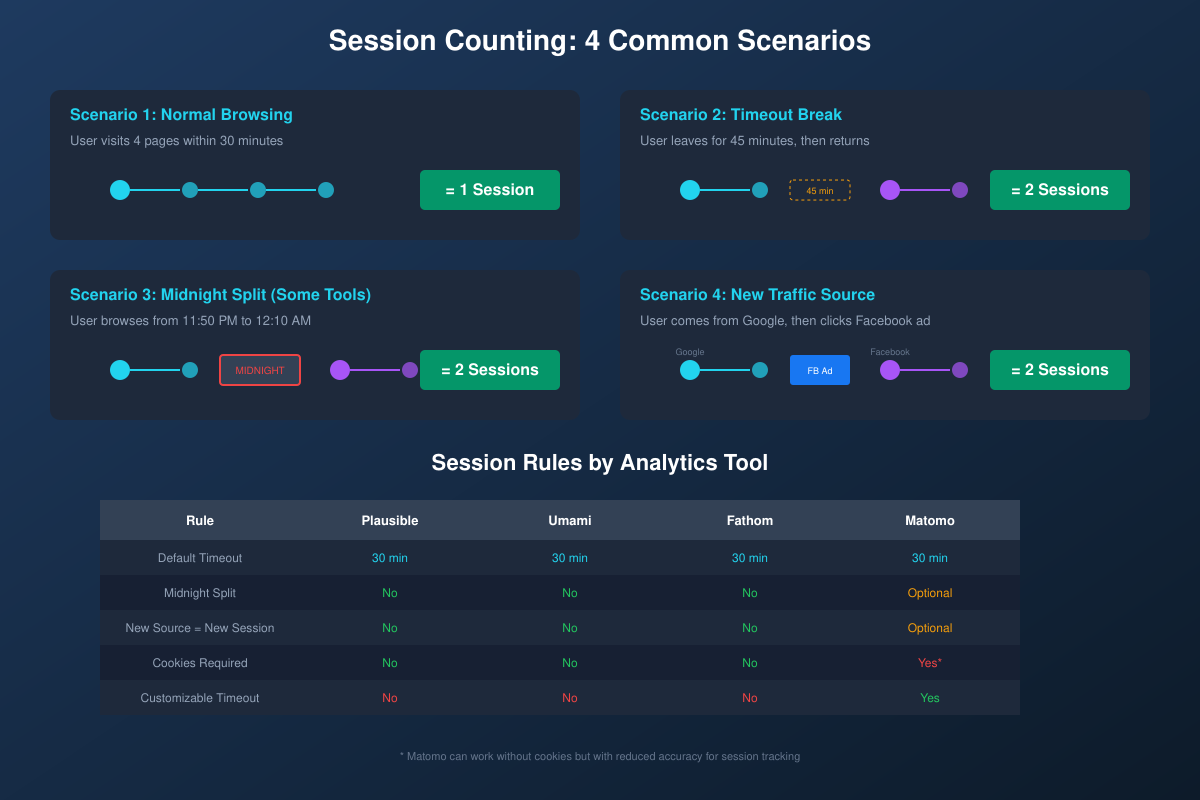
Scenario 1: Normal Browsing
User visits your site at 2:00 PM, browses 4 pages over 15 minutes, then leaves.
Result: 1 session, 4 pageviews
Straightforward. All activity happened within the 30-minute window.
Scenario 2: Timeout Break
User visits at 2:00 PM, views 2 pages, leaves for a 45-minute meeting, returns and views 2 more pages.
Result: 2 sessions, 4 pageviews
The 45-minute gap exceeded the timeout, creating a session break.
Scenario 3: Midnight Split
User browses from 11:50 PM to 12:10 AM (20 minutes total, crossing midnight).
Result varies by tool:
- Plausible, Umami, Fathom: 1 session (no midnight split)
- Matomo (with day-based sessions): 2 sessions (split at midnight)
Midnight splits inflate session counts artificially. Privacy-first tools avoid this behavior.
Scenario 4: New Traffic Source
User arrives from Google search, browses for 5 minutes, then clicks a Facebook ad for your site (opening in the same browser).
Result varies by tool:
- Plausible, Umami, Fathom: 1 session (source changes don’t split sessions)
- Matomo (optional setting): 2 sessions (new campaign = new session)
The “new source = new session” rule exists to give accurate attribution data but inflates total session counts.
How Different Analytics Tools Count Sessions
Not all analytics tools implement sessions the same way. Here’s how the major privacy-first options compare:
| Feature | Plausible | Umami | Fathom | Matomo |
|---|---|---|---|---|
| Default timeout | 30 min | 30 min | 30 min | 30 min |
| Midnight split | No | No | No | Optional |
| New source = new session | No | No | No | Optional |
| Requires cookies | No | No | No | Yes* |
| Customizable timeout | No | No | No | Yes |
*Matomo can run without cookies but with reduced session accuracy
Cookie-Free Session Tracking
Traditional analytics used cookies to maintain session state. Modern privacy-first tools use alternative methods:
- Hash-based identification: Combining IP address, user agent, and date into a daily hash
- Session storage: Using browser sessionStorage instead of cookies
- Server-side sessions: Tracking sessions on the server rather than client
These methods provide session tracking without requiring cookie consent banners—a significant compliance advantage under GDPR and similar regulations.
Session Metrics That Matter
Sessions power several important analytics metrics:
Pages Per Session
Total pageviews divided by total sessions. Indicates how deeply users explore your site.
- Benchmark: 2-3 pages per session is typical
- Blog sites: Often lower (1.5-2) as users read one article and leave
- E-commerce: Often higher (4-6) as users browse products
Average Session Duration
Time between first and last interaction in a session.
Important caveat: Single-page sessions have 0:00 duration by default. If someone spends 10 minutes reading your blog post but never clicks anything else, the session duration is recorded as zero. This is why bounce rate and session duration can be misleading for content sites.
Bounce Rate
Percentage of single-page sessions. A “bounce” is a session with only one pageview.
Bounce rate has significant limitations—a user who reads your entire article and leaves satisfied counts as a bounce. Many analytics professionals now prefer engagement-based metrics instead.
Common Session Counting Problems
Problem 1: Bot Traffic Inflating Sessions
Bots and crawlers generate sessions too. Quality analytics tools filter known bots, but new or custom bots may slip through. Signs of bot traffic:
- Sessions with 0:00 duration from unusual locations
- Spikes in traffic with no corresponding business activity
- High session counts from datacenter IPs
Problem 2: Single-Page Apps Undercounting
Single-page applications (SPAs) built with React, Vue, or Angular don’t trigger traditional pageviews when navigating. Without proper configuration, an entire session might appear as one pageview.
Solution: Implement virtual pageview tracking when routes change.
Problem 3: Cross-Device Sessions
A user researches on their phone, then purchases on their laptop. Without user ID tracking, this appears as two separate visitors with two separate sessions—fragmenting the customer journey.
Privacy-first analytics typically don’t track across devices (by design), so keep this limitation in mind when analyzing user behavior.
Practical Tips for Session Analysis
Key Takeaways
Understanding sessions helps you interpret analytics data correctly:
- A session is a single visit, containing one or more pageviews from one user
- 30 minutes of inactivity ends a session (industry standard)
- Different tools count differently—midnight splits and source changes vary
- Session metrics have blind spots—single-page sessions show 0:00 duration
- Privacy-first tools track sessions without cookies, avoiding consent banner requirements
Sessions remain fundamental to web analytics, even as the industry shifts toward engagement-based metrics. By understanding how they work, you’ll make better decisions from your data—and avoid common misinterpretations that lead to wrong conclusions.