
“You had 10,000 unique visitors last month.” Sounds straightforward. But what does that number actually mean? And how accurate is it?
Understanding unique visitors is essential for measuring your website’s real reach. Unlike pageviews (which count every page load) or sessions (which count every visit), unique visitors attempt to count actual people—the humans behind the clicks.
But here’s what most analytics guides won’t tell you: unique visitor counts are never 100% accurate. The methods used to identify visitors have fundamental limitations that every marketer should understand.
What Is a Unique Visitor?
A unique visitor represents one person (or more precisely, one browser/device) visiting your website within a specific time period, regardless of how many times they visit.
The key distinction:
- Same person visits 5 times today = 1 unique visitor, 5 sessions
- Same person visits 3 days this week = 1 unique visitor (weekly), 3 sessions
- 5 different people visit once each = 5 unique visitors, 5 sessions
Unique visitors help you understand your actual audience size, not just activity levels. A site with 10,000 pageviews could have 10,000 people viewing one page each, or 100 people viewing 100 pages each—very different situations requiring different strategies.
The Metrics Hierarchy: Visitors, Sessions, Pageviews
These three metrics form a pyramid, with unique visitors at the top:

Understanding this hierarchy helps you calculate important ratios:
| Metric | Formula | What It Tells You |
|---|---|---|
| Sessions per Visitor | Sessions ÷ Unique Visitors | How often people return |
| Pages per Session | Pageviews ÷ Sessions | How deeply people explore |
| Pages per Visitor | Pageviews ÷ Unique Visitors | Total engagement per person |
A healthy website typically shows:
- 1.3-2.0 sessions per visitor (monthly)
- 2-4 pages per session
- 3-6 pages per visitor (monthly)
How Analytics Tools Identify Unique Visitors
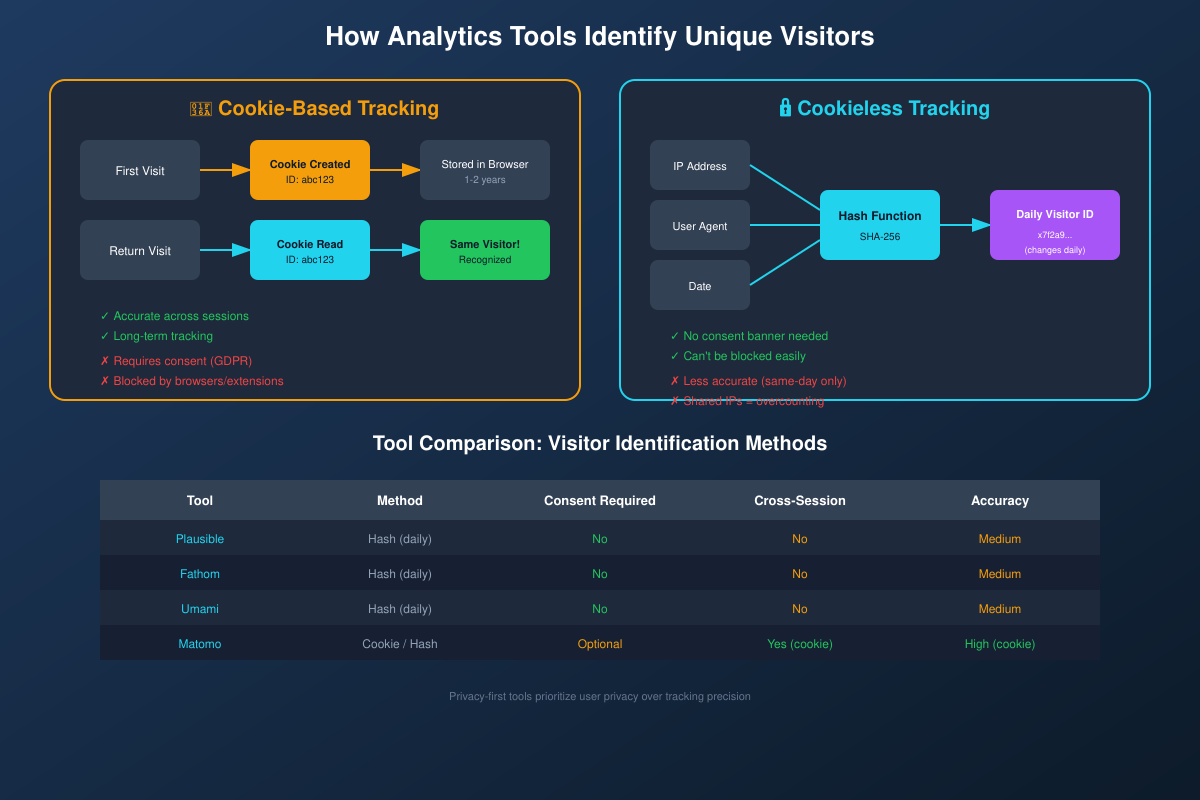
Different analytics tools use different methods to identify returning visitors. The two main approaches are cookie-based tracking and cookieless (hash-based) tracking.
Cookie-Based Tracking
Traditional analytics tools place a small text file (cookie) in the visitor’s browser. This cookie contains a unique identifier that persists across sessions.
How it works:
- First visit: Analytics creates a unique ID (e.g., “abc123”) and stores it in a cookie
- Return visit: Browser sends the cookie back, analytics recognizes “abc123”
- Same visitor confirmed across multiple sessions
Advantages:
- Accurate across sessions (days, weeks, months)
- Can track returning visitors over long periods
- Reliable identification within the same browser
Disadvantages:
- Requires cookie consent banner (GDPR, CCPA)
- Blocked by many browsers and extensions
- Cleared when users delete cookies
- Doesn’t work across different browsers/devices
Cookieless (Hash-Based) Tracking
Privacy-first analytics tools like Plausible, Fathom, and Umami use a different approach. They create a daily “fingerprint” by hashing together:
- IP address
- User agent (browser/device info)
- Website domain
- Current date
This creates a unique identifier that:
- Works within a single day
- Resets at midnight (can’t track across days)
- Can’t be reversed to identify individuals
- Doesn’t require cookies or consent banners
Advantages:
- No consent banner required
- Can’t be blocked by cookie blockers
- Privacy-preserving (no personal data stored)
- GDPR compliant by design
Disadvantages:
- Less accurate (same-day only)
- Can’t identify returning visitors across days
- Shared IPs (offices, VPNs) cause undercounting
Why Unique Visitor Counts Are Never 100% Accurate
Every analytics tool faces fundamental limitations in counting unique visitors. Understanding these helps you interpret your data correctly.
The Cross-Device Problem
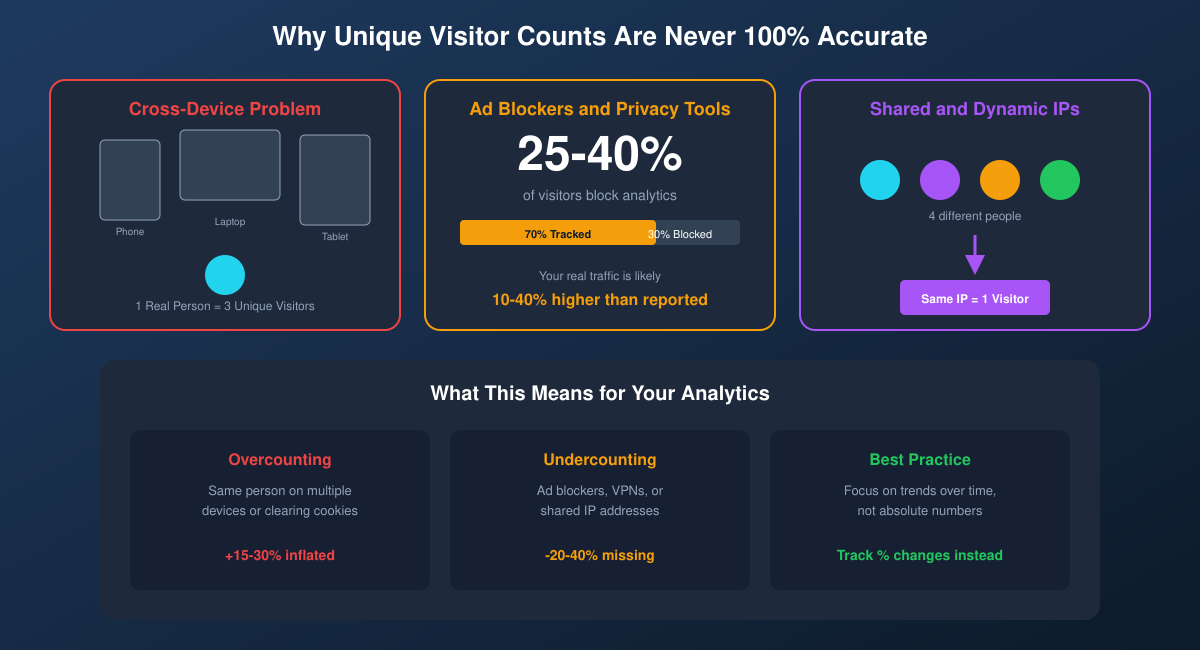
When someone browses on their phone, then continues on their laptop, analytics sees two different “unique visitors.” The same person researching a purchase across three devices appears as three unique visitors.
Impact: Overcounting by 15-30% for sites with mobile-heavy audiences.
Ad Blockers and Privacy Tools
A significant portion of your visitors actively block analytics:
- 25-40% of visitors use ad blockers (higher for tech audiences)
- Safari’s Intelligent Tracking Prevention blocks many cookies
- Firefox Enhanced Tracking Protection is on by default
- Brave browser blocks all tracking by default
Impact: Undercounting by 20-40%, meaning your real traffic is likely higher than reported.
Shared and Dynamic IP Addresses
For cookieless analytics, IP-based identification has limitations:
- Office networks: 50 employees on one IP = potentially counted as 1 visitor
- Mobile carriers: CGNAT means thousands share IPs
- VPNs: All users of a VPN server share one IP
- Universities: Entire campuses behind one IP
Impact: Undercounting for cookieless tools, especially for B2B audiences.
Cookie Clearing and Private Browsing
For cookie-based analytics:
- Users who clear cookies appear as new visitors each time
- Incognito/private mode doesn’t persist cookies
- Some browsers clear cookies on close
Impact: Overcounting by 10-20% for cookie-based tools.
New Visitors vs Returning Visitors
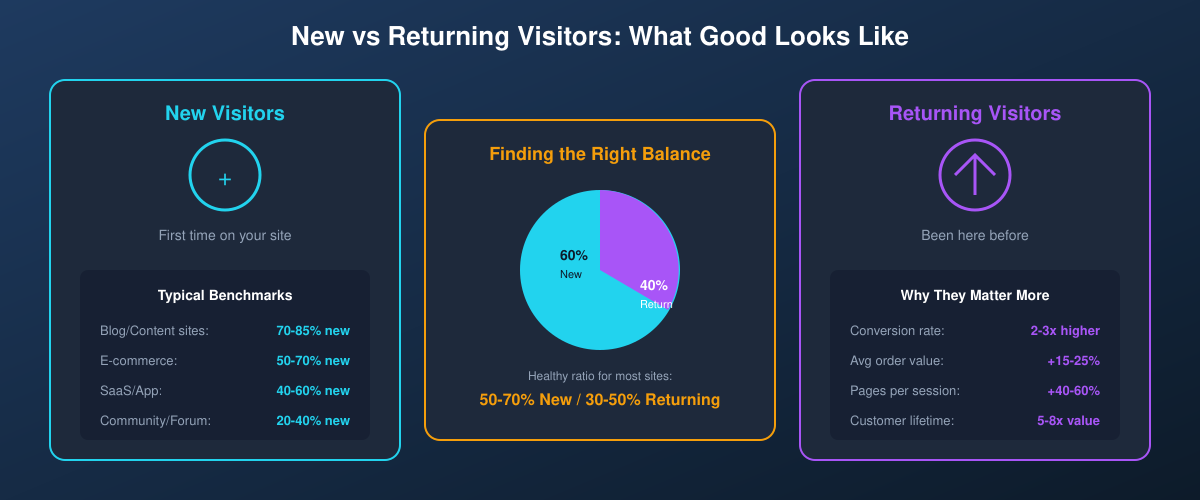
Most analytics tools segment unique visitors into “new” (first time) and “returning” (been here before). This split reveals important patterns about your audience.
What’s a Good New vs Returning Ratio?
The ideal ratio depends on your business type:
| Site Type | Typical New % | Typical Returning % |
|---|---|---|
| Blog/Content site | 70-85% | 15-30% |
| E-commerce | 50-70% | 30-50% |
| SaaS/Web app | 40-60% | 40-60% |
| Community/Forum | 20-40% | 60-80% |
Why Returning Visitors Matter More
While new visitors grow your reach, returning visitors drive business results:
- 2-3x higher conversion rate than new visitors
- 15-25% higher average order value
- 40-60% more pages viewed per session
- 5-8x higher customer lifetime value
If your returning visitor percentage is declining, it signals potential problems with content quality, user experience, or brand loyalty.
Privacy-First Tools: A Different Approach to Counting
Privacy-first analytics tools make deliberate tradeoffs. They sacrifice some tracking precision in exchange for:
- No consent banners — Cleaner user experience
- No personal data — Reduced compliance burden
- Can’t be blocked — More complete traffic picture
- Simpler implementation — No cookie management
For most websites, the slight reduction in accuracy is worth these benefits. You’re still getting directionally correct data—enough to make informed decisions.
How to Use Unique Visitor Data Effectively
Given the inherent limitations, here’s how to make the most of your unique visitor metrics:
Focus on Trends, Not Absolutes
Don’t obsess over the exact number. Instead, track:
- Week-over-week growth rate
- Month-over-month patterns
- Year-over-year comparisons
If unique visitors grew 15% this month, that’s meaningful regardless of whether the absolute number is slightly over or undercounted.
Segment by Source
Unique visitors from different sources have different values:
- Organic search: High intent, discovering your content (see traffic sources explained)
- Direct traffic: Brand awareness, returning users
- Social: Often casual browsers, lower intent
- Referral: Pre-qualified by the referring site
Compare Ratios
Ratios are more stable than raw numbers:
- New vs returning ratio — Is your audience growing or stagnating?
- Sessions per visitor — Are people coming back?
- Conversion rate per visitor — Are you attracting the right people?
Set Realistic Expectations
Accept that your unique visitor count is an estimate. A reasonable mental model:
- Reported number likely undercounts total traffic by 10-30% (ad blockers)
- Reported number might overcount actual people by 10-20% (cross-device)
- These effects partially cancel out
- The trend direction is usually accurate
Key Takeaways
- Unique visitors count people, not pages or sessions—the top of the metrics hierarchy
- Cookie-based tracking is accurate across sessions but requires consent
- Cookieless tracking preserves privacy but only works within a single day
- No method is 100% accurate—cross-device, ad blockers, and shared IPs all affect counts
- Focus on trends rather than absolute numbers for reliable insights
- Returning visitors typically convert 2-3x better than new visitors
Understanding these limitations doesn’t make analytics less useful—it makes your analysis more sophisticated. You’re no longer taking numbers at face value, but interpreting them with appropriate context.